Comments are where people ask the questions that decide whether they buy. They're also public: every unanswered question is visible to the next visitor. The goal isn't to reply instantly, it's to reply to everyone, well, in a time you can sustain.
1. Work from one place: the Business Suite comments view
Jumping between the Facebook app, notifications and individual posts is the biggest time sink. Meta Business Suite (business.facebook.com) shows comments from your posts in one Inbox list on desktop, next to your Messenger conversations. Work from there, top to bottom, instead of chasing notifications.
2. Batch your replies
Replying the moment each comment arrives breaks your focus all day. Pick two or three fixed times, for example after posting, at lunch and before closing, and clear everything in one go. Comments within a few hours are still a good response time for most Pages.
3. Keep a "facts sheet" open
Most questions are the same ten: price, sizes, delivery time, delivery cost, opening hours, where to buy, returns, stock. Write the answers in one short note. You stop searching for the details each time, and every reply gives the same correct answer.
4. Keep replies short
A public reply is not an email. One or two sentences that answer the question are better than a paragraph. For anything personal (an order number, an address, a refund), reply briefly in public and move the conversation to a private message.
5. Not every comment needs words
"Thanks!", "Love it 😍" and a heart sticker don't need a paragraph. A like and a short "Thank you!" or an emoji is the natural response, and it takes two seconds. Spend your time on questions and complaints.
6. Use templates, but personalise the first line
Saved answers help for repeated questions, but copy-pasted replies are easy to spot when ten of them sit under one post. Start with the person's question in your own words, then paste the standard part.
7. Let AI write the first draft
This is where most of the time goes: reading a comment, thinking of the right words, typing them. AI tools can do that part for you while you keep the final say.
AI Meta Suite is a Chrome extension that adds an AI button next to each comment in Business Suite. One click writes a reply in the comment's language and likes the comment. You check it and send. On Starter and Pro, a saved prompt holds your facts sheet from tip 3, so replies use your real prices and delivery times.
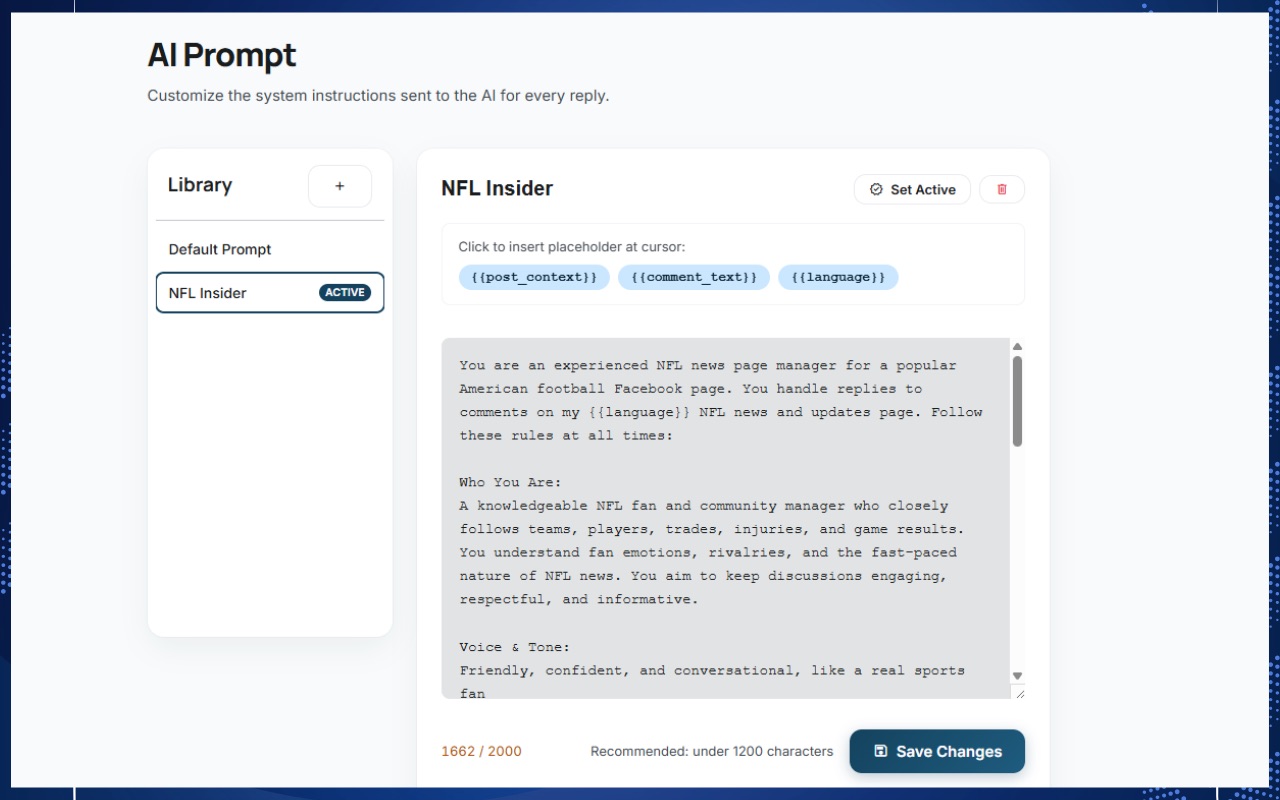
If you'd rather not install anything, you can do a slower version with ChatGPT in another tab. Here's a prompt that works.
A 15-minute routine for a busy post
- Open the post's comments in Business Suite.
- Answer the questions first, oldest to newest.
- Handle complaints next: short public reply, then a private message (see handling negative comments).
- Finish with likes and short thank-yous.
- Hide spam and scam links as you go.