Most "auto reply" tools for Facebook work with rules: if a comment contains a keyword, send a fixed message. That's fine for "PRICE" or "LINK", but most comments don't follow a script. People ask about shipping, complain about a late order, tag a friend, or post a sticker. A fixed message reads wrong for all of them.
AI Meta Suite takes a different approach. It's a Chrome extension that adds an AI button next to every comment in Meta Business Suite. Each click writes a new reply for that specific comment, based on what the person wrote (and, on Starter and Pro, what your post says).
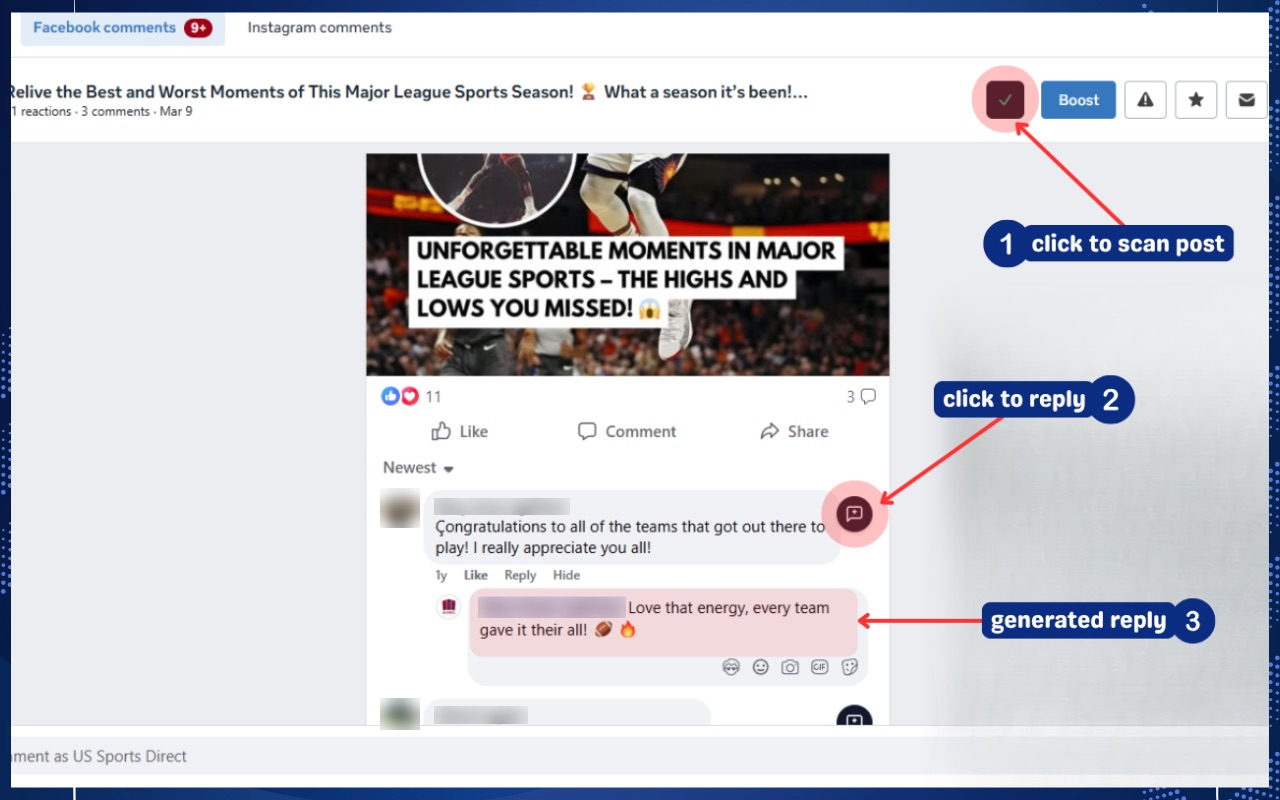
How it works
- Open a post's comments in Meta Business Suite (business.facebook.com). The extension starts by itself.
- Click "Scan AI Context" once. The extension reads the post. On Starter and Pro, the post text goes into your saved prompt, so replies know what the post is about.
- Click the AI button next to a comment. A reply appears in the reply box, and the comment gets a like.
- Read it, edit if you want, and send. Then move to the next comment.
On a busy post, that's a few seconds per comment instead of a minute or two of thinking and typing.
What the replies look like
These examples use the default settings (Friendly tone, Short length) on a made-up clothing shop Page. The extension answers questions directly, matches the commenter's language, and doesn't add hashtags or emojis the commenter didn't use.
Thank-you comments get a short answer or just emojis, never a paragraph. A sticker or GIF with no words gets a fitting emoji reply.
Facts the AI can't know. In the first example, "3 to 5 business days" only works if it's true for your shop. Put your real shipping times, prices and policies in a saved prompt (Starter and Pro), and the AI uses them. Without that, always check replies that state facts before you send.
Why not a fully automatic bot?
Because one wrong public reply costs more than the time it saves. AI Meta Suite never posts on its own: every reply sits in the reply box until you send it. You stay in control of what your Page says, and you can still handle 50 comments in the time 10 used to take.
It also means nothing runs in the background and there's no access to give to a third-party app. The extension works inside your own logged-in Business Suite tab.
What it handles
- Questions, complaints and compliments, each with a fitting length. Complaints get an empathetic reply and an offer to help.
- Photos, stickers and GIFs. The AI looks at the image and replies to what it shows, on every plan.
- Any language. Replies come back in the language of the comment. See replying in any language.
- Your voice. Choose Friendly, Professional, Casual or Empathetic, and Short, Medium or Long. On Starter and Pro, save up to 5 prompts with your brand rules.
Plans
The Free plan gives you 20 replies a month with no card, which is enough to see if it fits your Page. Starter is $3.99 a month for 300 replies and Pro is $9.99 a month for 1,500. Compare plans.
Questions
Does it reply automatically while I'm away?
No. It writes the reply when you click, and you send it. That's on purpose: a person checks every public reply. If you need replies sent while you're offline, Meta's Inbox automations or a chatbot tool are a better fit. See AI Meta Suite vs Meta's automated responses.
Is it safe for my Page?
The extension only fills the reply box in your own browser tab, the same as typing. It doesn't use a bot account, run in the background, or ask for your Facebook password.
Does it work on facebook.com or only Business Suite?
It works in Meta Business Suite (business.facebook.com) in Chrome and other Chromium browsers such as Edge and Brave.
Which AI model does it use?
Replies are written by OpenAI's GPT-4o mini, through our server. We send the comment, any image in it and your reply settings. On Starter and Pro we also send your saved prompt, which can include the post text. See the privacy policy.